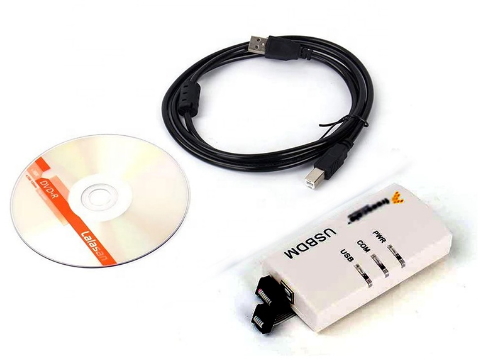
USBDM Emulator OSBDM USB BDM Download Debugger 48MHz USB2.0 Interface
Tips:
1.
CodeWarrior software must be installed on the default installation
directory path,not allowed to change, because the driver is
installed by default to the drive C default installation directory.
2.
Installation Steps:
Step 1:
Install the required software IDE
Step 2:
Install USBDM driver software;
Step 3:
Connect BDM to computer via USB cable;
Step 4:
Manually install BDM equipment;
Step 5:
Congratulations, you can use the target board.
Description:
The target
board to manually select 3.3V/5.0V power supply (target board power
supply: 3.3V 500mA/5.0V 500mA);
Online
download, single-step debugging and emulation, observed values of
all registers and global variables;
CPU 48MHz
clock speed, USB2.0 interface;
Support
chips:
8-bit
microcontroller: HCS08 Series;
16-bit
microcontroller: the HCS12 to (including those without the SYNC
feature (eg 9S12DP256B) series;
32: Coldfire
V1 microcontrollers;
USBDM
support three breakpoint debugging;
Can be
developed in the following software development IDE (old and new
versions of CW takes all!):
Codewarrior
V10.2 (Eclipse version)
Codewarrior
V10.1 (Eclipse version)
CodeWarriorLegacy versions
Codewarrior
Development Studio for HCS12 (X) V5.1 &
CW for
Microcontrollers V6.3 (RS08 is not supported)
Initial
support for CodeSourcery Lite forColdfire
The
protection circuit emulator:
USB port
with ESD protection circuitry, 500mA resettable fuse;
BDM output
data lines each plus overvoltage protection ESD protection;
BDM output
port power foot plus TVS, overvoltage protection;
Self-powered
use 500mA resettable fuse;
The
emulators support for the chip list:
MC9S08AC128,
MC9S08AC16, MC9S08AC32, MC9S08AC48, MC9S08AC60, MC9S08AC8,
MC9S08AC96, MC9S08AW16, MC9S08AW16A, MC9S08AW32, MC9S08AW48,
MC9S08AW60, MC9S08AW8A
MC9S08DE32,
MC9S08DE60, MC9S08DN16, MC9S08DN32, MC9S08DN48, MC9S08DN60,
MC9S08DV128, MC9S08DV16, MC9S08DV32, MC9S08DV48, MC9S08DV60,
MC9S08DV96, MC9S08DZ128, MC9S08DZ16, MC9S08DZ32, MC9S08DZ48,
MC9S08DZ60, MC9S08DZ96
MC9S08EN16,
MC9S08EN32
MC9S08EL16,
MC9S08EL32
MC9S08GB32,
MC9S08GB32A, MC9S08GB60, MC9S08GB60A, MC9S08GT16, MC9S08GT16A,
MC9S08GT32, MC9S08GT32A, MC9S08GT60, MC9S08GT60A, MC9S08GT8A
MC9S08JM16,
MC9S08JM32, MC9S08JM60, MC9S08JM8
MC9S08JR12
MC9S08LC36,
MC9S08LC60
MC9S08QA4,
MC9S08QD2, MC9S08QD4, MC9S08QE128, MC9S08QE16, MC9S08QE32,
MC9S08QE32, MC9S08QE4, MC9S08QE64, MC9S08QE8, MC9S08QE96, MC9S08QG4,
MC9S08QG8
MC9S08RC16,
MC9S08RC32, MC9S08RC60, MC9S08RC8, MC9S08RD16, MC9S08RD32,
MC9S08RD60, MC9S08RD8, MC9S08RE16, MC9S08RE32, MC9S08RE60,
MC9S08RE8, MC9S08RG32, MC9S08RG60
MC9S08SG16,
MC9S08SG32, MC9S08SG4, MC9S08SG8
MC9S08SH16,
MC9S08SH32, MC9S08SH4, MC9S08SH8
MC9S08SL16,
MC9S08SL8
MC9S12A128B,
MC9S12A256B, MC9S12A32, MC9S12A64, MC9S12A512
MC9S12B64,
MC9S12B128
MC9S12C32,
MC9S12C64, MC9S12C96
MC9S12D32,
MC9S12D64, MC9S12DB128A, MC9S12DB128B, MC9S12DG128B, MC9S12DG256B,
MC9S12DJ128B, MC9S12DJ256B, MC9S12DJ64, MC9S12DP256B, MC9S12DJ64,
MC9S12DP256B, MC9S12DP512, MC9S12DT128B, MC9S12DT256, MC9S12DT256B
MC9S12E32,
MC9S12E64, MC9S12E128, MC9S12E256
MC9S12G96,
MC9S12G128
MC9S12GC16,
MC9S12GC32, MC9S12GC128
MC9S12H128,
MC9S12H256, MC9S12HN64, MC9S12HZ64, MC9S12HZ128, MC9S12HZ256
MC9S12HA32,
MC9S12HA48, MC9S12HZ64
MC9S12HY32,
MC9S12HY48, MC9S12HY64
MC9S12I32,
MC9S12I128
MC9S12KC64,
MC9S12KC128, MC9S12KG64, MC9S12KG128, MC9S12KG256, MC9S12KL64,
MC9S12KL128, MC9S12KT128, MC9S12KT256
MC9S12NE64
MC9S12P32,
MC9S12P64, MC9S12P96, MC9S12P128
MC9S12Q32,
MC9S12Q64, MC9S12Q96, MC9S12Q128
MC9S12T64
MC9S12UF32
MC9S12XA128,
MC9S12XA256, MC9S12XA512
MC9S12XB128,
MC9S12XB256
MC9S12XD64,
MC9S12XD128, MC9S12XD256, MC9S12XDG128, MC9S12XDP512, MC9S12XDQ256,
MC9S12XDT256, MC9S12XDT384, MC9S12XDT512
MC9S12XEG128, MC9S12XEP100, MC9S12XEP768, MC9S12XEQ384,
MC9S12XEQ512, MC9S12XET256
MC9S12XFR128
MC9S12XHY128, MC9S12XHY256
MC9S12XS64,
MC9S12XS128, MC9S12XS256
Compatible
IDEs
Codewarrior
V10.x(Eclipse version)
Tested on
Windows-XP-32bit,Windows-XP-64bit,
Windows-7-64bit,Windows-7-32bit
Tested on
Ubuntu-32-bit
CodeWarriorLegacy versions
Codewarrior
Development Studio for HCS12(X) V5.1(HCS12 ),V5.2
Tested on
Windows-XP-32bit,Windows-XP-64bit,
Tested on
Windows-7-64bit,Windows-7-32bit
CW for
Microcontrollers V6.3(RS08 is not supported)
Tested on
Windows-XP-32bit,
Initial
support for CodeSourcery Lite for Coldfire
Tested on
Windows-XP-32bit
Package Included:
1 X USB-BDM
Host
1 X USB
print cable
1 X 6P
cable