| Apply: 1.Design and debuge in electron
circuitry
2.Industry controling and power measure
3.View moment signal
4.Test in the manufacture
5.Education and trainning
6.Serving and maintaining
| Technical parameters: |
|
Model / Index |
SDS1022C |
|
|
|
| Bandwidth |
25MHZ |
|
|
|
| Channel |
2 channels +1 ext trig |
| Real Time Sampling |
500MSa / s |
| Equivalent Sampling Rate |
10GSa / s |
| Memory Depth |
4K/CH |
| Rise time |
<14ns |
|
|
|
| Input Impedance |
1MΩ | | 17Pf |
|
| Sec / div Range |
25ns/div-50s/div |
|
|
|
| Roll: 100ms-50s/div |
| Vertical Sensitivity |
2mv-5v/div (1-2-5 sequence) |
| Vertical Resolution |
8bit |
| Display |
Color TFT (320 * 234) 5.7 "LCD |
|
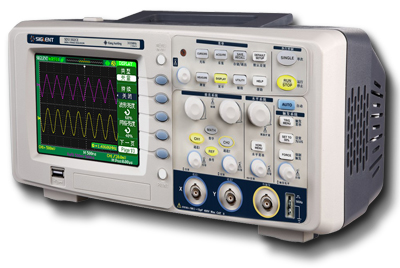
CHARACTERISTIC:
●
The volume
exquisite and it is convenient for
carrying.
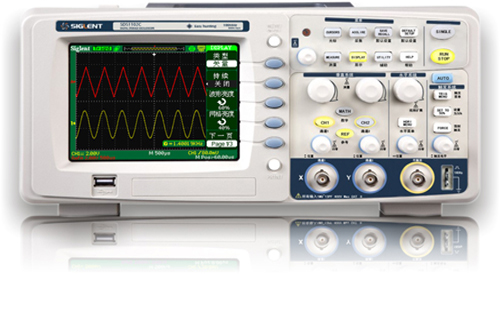
● Use Colored TFT LCD, the waveform
display is clearer and stable.
● Dual channel-channel bandwidth:
25MHZ.
● The real time sampling rate is
500MSa / s.
● Memory depth of SDS1000C is 4K.
● Trigger Modes: Edge, Pulse, Video,
Slope and Alternative trigger modes.
● Unique Digital Filter function and
Waveform recorder function
● Pass / Fail function
● Thirty two parameters Auto measure
function.
● Cursor measure covers Manual mode,
Track mode and Auto mode.
● Channel waveform and it's FFT
waveform display on split screen.
● Pop-up Menu display pattern is
more convenient for users using it.
● Multiple Language User Interface.
● Support
Multilingual
online help system
|
Model / Index |
The Common Specifications Of
All SDS1000 Series Products |
|
Display |
8X12 divides |
|
Waveform Capture Rate |
The highest capture rate
exceed 1000 times / sec |
|
Input coupling |
DC, AC, GND |
|
Input Max voltage |
400V(Vpp) |
|
Trigger Types |
Edge, Pulse, Video, Slope,
Alternative |
|
Trigger Modes |
Auto, Normal, Single |
|
Trigger Source |
CH1,CH2,Ext,Ext
/ 5,AC
Line |
|
Save / Recall |
Provide two groups reference
waveforms, twenty groups
capture waveforms and twenty
groups setups internal save
/ recall function and USB
flash drive Save / Recall
function |
|
Auto Measure Types |
Vpp, Vmax, Vmin, Vamp, Vtop,
Vbase, Cmean, Mean, Vrms,
Crms, ROVShoot, FOVShoot,
RPREShoot, FPREShoot, Freq,
Period, Rise time, Fall
Time, + Width,-Width, +Duty,
- Duty, BWid, Phase, FRR,
FRF, FFR, FFF, LRR, LRF,
LFR, LFF |
|
Cousor measure |
Manual, Track, Auto |
|
Sample Types |
Real Time, Equivalent Time |
|
Averages |
4,16,32,64,128,256 |
|
Math
|
+,--,*,Invert |
|
FFT |
Window:
Hanning,Hanmming,Blackman,Rectangular |
|
Sampling
Points:
1024
points |
|
XY
Mode
|
Phase Error: ± 3 degrees
Support the sampling rate:
5KSa / s~
200MSa
/ s (in a 1-2-5 sequence) |
|
Display Model |
Main, Window, Window Zoom,
Roll, X-Y |
|
Menu Display |
2Sec, 5Sec, 10Sec, 20Sec,
Infinite |
|
Display Language |
Simplified Chinese,
Traditional Chinese,
English, Arabic, French,
German, Russian, Spanish,
Portuguese, Japanese,
Korean, Italiana |
|
Power Source Voltage |
100-240VAC,47HZ-440HZ,50VA
Max |
|
Size and Weight |
305mm x 154mm x133mm,
About2.3kg |
|
Accessories |
(1:1,10:1)
Problex2, EasyScope3.0
Computer Software System,
Power Cord, USB cable, User
Manual, EasyDsoLib software
package,
USB Host: Support USB flash
drive storage
USB Device: Support
PictBridge compatible
printers and PC Remote
control |
|
Options |
RS-232 Communication Module,
Serial Interface
Communication Module,
Pass / Fail Interface Module |
|
|
|
*Application
software:
EasyScope3.0 software can connect the
SDS1000 series DSO to the PC through USB
serial interface or RS-232 interface
The software can afford controling and
analysing function such as following
items:
1: Display the captured waveforms, datas
and measurement value by the display
areas.
2: Control the local and distant
operation by the DSO control.ler.
3: Save the picture as "BMP" format
4: Save the data to "EXCEL" file, easy
to analyse
5: Print or save waveforms.
*EasyDsoLib
Software development kit:
The SDK provides interface
function to customers used for secondary
development, including DSO sampling
data, product version, waveform dats and
parameter setting.Automatically
measuring parameters, upload or download
the DSO settings or controling the
interface function.Make your development
much easier and effective. |
|
|
|